’ve had some good experiences with Dell’s XPS line of laptops over the years, but in virtually every case I’ve had a few minor complaints. The earlier models were large, fast, and too expensive for most users. Then Dell dropped the XPS line for a while and went with the Studio XPS—still generally expensive and there were performance elements that came up short (e.g. the Studio XPS 16 had an awesome RGBLED backlit display, but it tended to run a bit toasty and the hardware wasn’t as fast as previous XPS offerings). With the relaunch of the XPS line in late 2010, the original XPS 15 delivered a great display and a well-balanced set of components that was enough to earn our Gold Editor’s Choice award, but the chassis was understandably a bit too bulbous for some tastes. The XPS 15 Sandy Bridge update improved the CPU and GPU options, but six months after the first XPS 15 I was even less enamored with the chassis. Next up in the list of progression was the XPS 15z, which improved some areas but regressed in others. It had a thinner, sleeker looking chassis, but dropped support for quad-core processors, downgraded the GPU slightly, had some thermal concerns, and perhaps most worrisome was the build quality. I posted an update a few months after the review that summed things up nicely: “I can't stress enough how it feels like Dell cut a few corners and the result is a laptop that doesn't hold up as well as I'd like over the long haul…. When the inevitable Ivy Bridge update of the 15z comes out, you can bet I'm going to pound on it a little more.” And that brings us to the new XPS 15, which has a completely redesigned chassis. Did Dell listen to my complaints about the 15z build quality? You better believe it!

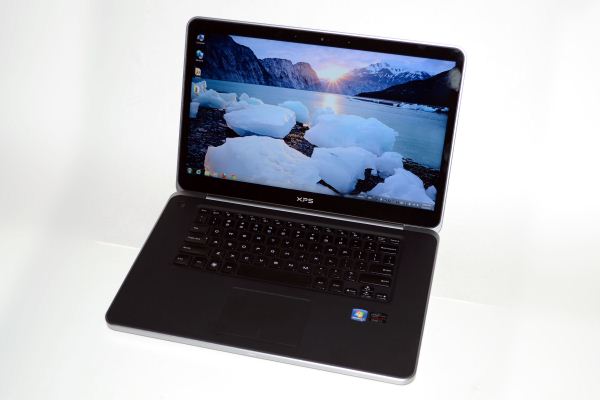
Superficially, the new XPS 15 looks quite similar to the 15z, at least in pictures. Meet one in person, however, and the changes are immediately noticeable. Many suggested that the XPS 15z was trying to clone Apple’s MacBook Pro, but that’s somewhat disingenuous—unless you consider any laptop that aims to be slimmer and silver to be a MBP clone, I suppose. I would however suggest that it did take more than a couple design cues from Cupertino, including a strikingly similar keyboard layout. The newest model keeps the 15z keyboard layout (which is still a step back from the XPS 15 L501x/L502x in my opinion), but ditches the silver palm rest and keyboard area for a matte black surface with a soft-touch coating. The touchpad also gets a clickable MBP-like interface that we’ve seen on just about every Ultrabook along with many newer laptops. Personally, I still prefer touchpads with separate non-integrated buttons, so this is another step back.
What’s not a step back is the chassis itself, which is now the most MacBook Pro-like chassis I’ve encountered in a non-Apple product. It uses machined aluminum for the main chassis and frame, similar to Apple’s unibody chassis, and it’s thicker and far more rigid than any previous Dell XPS laptop. Even the display cover gets a thick aluminum backing, so there’s really no twisting or flexing to speak of. The palm rest on the other hand isn’t machined aluminum but instead uses magnesium with a soft-touch coating. If you thought the XPS 15z copied a lot of Apple’s design, the XPS 15 will only cement that impression, but really I don’t care: if a competing product is better, then stealing a few ideas isn’t going to hurt my review of it. [Insert obligatory Steve Jobs quote about great artists stealing….]
Here’s the spec sheet for the new XPS 15, and I’ve included the specs of the last-gen MacBook Pro 15 as a reference point. Note that unlike the MacBook Pro Retina, Dell continues to include a DVDRW/Blu-ray optical drive with their XPS 15.
Here’s the spec sheet for the new XPS 15, and I’ve included the specs of the last-gen MacBook Pro 15 as a reference point. Note that unlike the MacBook Pro Retina, Dell continues to include a DVDRW/Blu-ray optical drive with their XPS 15.

No hay comentarios:
Publicar un comentario