Gigabyte GA-Z77X-UD5H Overview
Ever since I started reviewing, I have been critical of Gigabyte – they seem eager to put out a product that works, and not willing to take much time to invest in their products or users for the sake of improving the relationship. It seems a very sales-driven company overall, thus it is lucky that it sells a good number of motherboards, and is a top-tier motherboard manufacturer with hands in many markets.
Competition, as always, comes from all sides – users are perhaps moving away from the standard desktop scene into mobile devices, or other motherboard manufacturers want a slice of Gigabyte’s large pie. The motherboard business, while growing, is not growing as fast as it once was – in order to gain market share it has to be taken from someone else. This has caused companies like Gigabyte to knuckle down hard and find ways to remain competitive.
One Gigabyte tactic (of late) is to take its motherboard lineup and attempt to push it down one price point. This is either through manufacturing costs, bundling, special deals and presumably a myriad of other ways internally to achieve this. We saw this on the X79-UD3 especially. The downside of scrimping to meet a lower price point is often the absence of effort, particularly when there is a lack of substance to a motherboard bundle – it needs to feel that the board is good value, rather than just be good value.
Here steps in the Z77X-UD5H. On paper it has a range of included extras – dual NIC, extra SATA 6 Gbps ports, three-way PCIe 3.0 GPU gaming without a $30 expansion chip, an mSATA port, TPM, up to ten USB 3.0 ports and a full range of video outputs, all in a $180 (MSRP $200) bundle. Competition at this price point comes from the ASUS P8Z77-V LE Plus, the ASRock Z77 Extreme6, the MSI Z77A-GD65, Gigabyte’s own G1 Sniper M3, and a for a little more, the ASUS P8Z77-I Deluxe and Maximus V Gene. All these boards fall in the $170-$200 window on Newegg at time of writing.
Performance wise, the Z77X-UD5H gets a high grade across the board. It benefits from having MultiCore Enhancement, giving an extra 200 MHz when fully loaded compared in Intel Turbo specifications – this helps the Gigabyte push the board in CPU related benchmarks. IO benchmarks are mid range, reaching the upper echelons on occasion. The single flaw in Gigabyte’s rather nice deck of cards is the DPC Latency test, which suffers initially at the hands of the EasyTune6 monitoring software (3000 microseconds+), but when this is disabled it hits a value double that of any other Z77 board. Judging by other manufacturers who have had this issue, a simple BIOS update should fix it.
The Gigabyte BIOS has slowly grown on me since its inception in graphical form. When I first covered the BIOS, it was slow and unresponsive and was not nice to play with. On the Z77X-UD5H though, it is smooth sailing with almost all the options easy to hand. The software supplied with the motherboard, in the form of EasyTune6 and 3D Power, really needs a swift kick in the rear to bring it into the 21st century. In addition, users who want in-depth fan controls will need their own solution.
The Gigabyte Z77X-UD5H comes with a three-year warranty in North America, and for an extra $30 comes with an included WiFi card and antenna in the form of the Z77X-UD5H-WB WiFi. Overall, the Z77X-UD5H lights up the $180 price point like a beacon and is placed well for significant sales.
Visual Inspection
Gigabyte have three different aesthetic styles for the range of motherboards they produce – green and black for their gaming series, blue and black for their channel boards, and blue/white for their budget SKUs. The Z77X-UD5H is placed firmly in the midrange of Z77, resulting in a blue and black visual:
 The power delivery sections are covered by some beefy heatsinks, both of them connected via a heatpipe down to the chipset heatsink, which comes with fins to aid cooling. The socket itself is sized to Intel specifications, with power delivery coming close on two sides, mSATA on the south side and memory on the right. Users of large air coolers may struggle to deal with the heatsinks, as they measure approximately 32mm high from the PCB. There are three fan headers found around the socket area – one 4-pin to the top right of the socket, one 4-pin to the top left near the power connector, and another 4-pin the other side of the memory near the power button.
Down the right hand side, we have a trio of power/reset/clear CMOS buttons. The latter two are of similar size and shape, leading to perhaps a few four-letter profanities by enthusiasts using this board to overclock should they hit the wrong button, but the power button is big, red, and thus easy to hit first time. Under these is a two-digit debug LED, useful for troubleshooting POST issues, and a 4-pin fan header.
Gigabyte motherboards typically have a very busy motherboard between the right hand edge and the memory slots, and this is true here also. Continuing down the right hand side, we have the 24-pin ATX power connector, a USB 3.0 header (VIA VL810), and a SATA power connector (to give the PCIe extra juice). Typically, the PCIe extra power header is found above the PCIe, but I prefer it here as it makes cabling easier. Underneath these are eight of the SATA ports – four SATA 3 Gbps in black from the chipset, two SATA 6 Gbps in white also from the chipset, and two SATA 6 Gbps in grey from a Marvell 88SE9172 controller. The other SATA 6 Gbps ports on the motherboard are split between the single grey SATA port on the bottom, and the eSATA port on the IO panel.

Ever since I started reviewing, I have been critical of Gigabyte – they seem eager to put out a product that works, and not willing to take much time to invest in their products or users for the sake of improving the relationship. It seems a very sales-driven company overall, thus it is lucky that it sells a good number of motherboards, and is a top-tier motherboard manufacturer with hands in many markets.
Competition, as always, comes from all sides – users are perhaps moving away from the standard desktop scene into mobile devices, or other motherboard manufacturers want a slice of Gigabyte’s large pie. The motherboard business, while growing, is not growing as fast as it once was – in order to gain market share it has to be taken from someone else. This has caused companies like Gigabyte to knuckle down hard and find ways to remain competitive.
One Gigabyte tactic (of late) is to take its motherboard lineup and attempt to push it down one price point. This is either through manufacturing costs, bundling, special deals and presumably a myriad of other ways internally to achieve this. We saw this on the X79-UD3 especially. The downside of scrimping to meet a lower price point is often the absence of effort, particularly when there is a lack of substance to a motherboard bundle – it needs to feel that the board is good value, rather than just be good value.
Here steps in the Z77X-UD5H. On paper it has a range of included extras – dual NIC, extra SATA 6 Gbps ports, three-way PCIe 3.0 GPU gaming without a $30 expansion chip, an mSATA port, TPM, up to ten USB 3.0 ports and a full range of video outputs, all in a $180 (MSRP $200) bundle. Competition at this price point comes from the ASUS P8Z77-V LE Plus, the ASRock Z77 Extreme6, the MSI Z77A-GD65, Gigabyte’s own G1 Sniper M3, and a for a little more, the ASUS P8Z77-I Deluxe and Maximus V Gene. All these boards fall in the $170-$200 window on Newegg at time of writing.
Performance wise, the Z77X-UD5H gets a high grade across the board. It benefits from having MultiCore Enhancement, giving an extra 200 MHz when fully loaded compared in Intel Turbo specifications – this helps the Gigabyte push the board in CPU related benchmarks. IO benchmarks are mid range, reaching the upper echelons on occasion. The single flaw in Gigabyte’s rather nice deck of cards is the DPC Latency test, which suffers initially at the hands of the EasyTune6 monitoring software (3000 microseconds+), but when this is disabled it hits a value double that of any other Z77 board. Judging by other manufacturers who have had this issue, a simple BIOS update should fix it.
The Gigabyte BIOS has slowly grown on me since its inception in graphical form. When I first covered the BIOS, it was slow and unresponsive and was not nice to play with. On the Z77X-UD5H though, it is smooth sailing with almost all the options easy to hand. The software supplied with the motherboard, in the form of EasyTune6 and 3D Power, really needs a swift kick in the rear to bring it into the 21st century. In addition, users who want in-depth fan controls will need their own solution.
The Gigabyte Z77X-UD5H comes with a three-year warranty in North America, and for an extra $30 comes with an included WiFi card and antenna in the form of the Z77X-UD5H-WB WiFi. Overall, the Z77X-UD5H lights up the $180 price point like a beacon and is placed well for significant sales.
Visual Inspection
Gigabyte have three different aesthetic styles for the range of motherboards they produce – green and black for their gaming series, blue and black for their channel boards, and blue/white for their budget SKUs. The Z77X-UD5H is placed firmly in the midrange of Z77, resulting in a blue and black visual:


Down the right hand side, we have a trio of power/reset/clear CMOS buttons. The latter two are of similar size and shape, leading to perhaps a few four-letter profanities by enthusiasts using this board to overclock should they hit the wrong button, but the power button is big, red, and thus easy to hit first time. Under these is a two-digit debug LED, useful for troubleshooting POST issues, and a 4-pin fan header.
Gigabyte motherboards typically have a very busy motherboard between the right hand edge and the memory slots, and this is true here also. Continuing down the right hand side, we have the 24-pin ATX power connector, a USB 3.0 header (VIA VL810), and a SATA power connector (to give the PCIe extra juice). Typically, the PCIe extra power header is found above the PCIe, but I prefer it here as it makes cabling easier. Underneath these are eight of the SATA ports – four SATA 3 Gbps in black from the chipset, two SATA 6 Gbps in white also from the chipset, and two SATA 6 Gbps in grey from a Marvell 88SE9172 controller. The other SATA 6 Gbps ports on the motherboard are split between the single grey SATA port on the bottom, and the eSATA port on the IO panel.
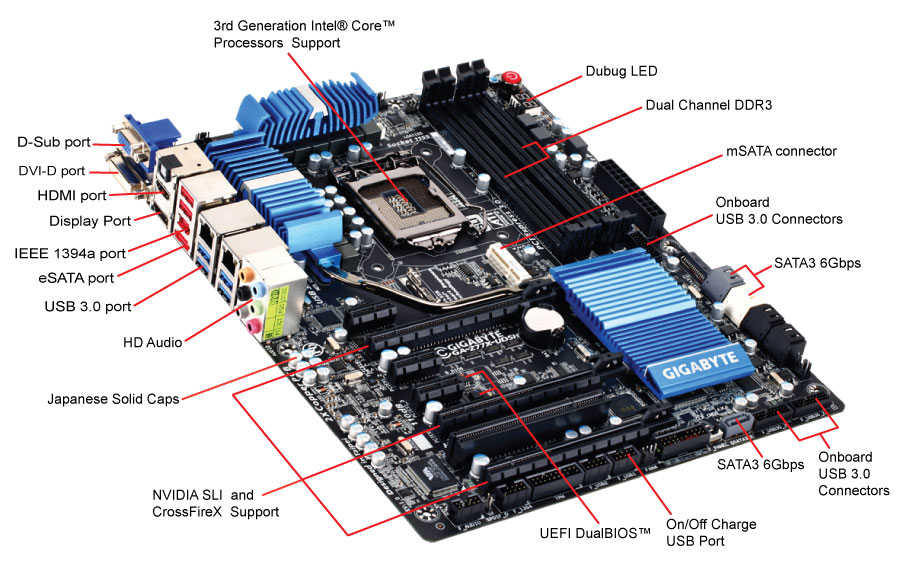
Along the bottom of the board are the headers – from right to left we have a pair of USB 3.0 headers (good for four more USB 3.0 ports from VIA controllers), the SATA 6Gbps port, a BIOS switch (for the dual BIOS system), the front panel connectors, two USB 2.0 headers, an IEEE1394 header, and a Trusted Platform header. This TPM is here as Gigabyte insists that a number of their customers request it, especially in business scenarios.
The PCIe layout is designed to work around the board design – due to the mSATA port between the socket and PCIe (on other boards we see the mSATA near the chipset, or between the PCIe slots), we start with a single PCIe x1. The rest of the PCIe are an x16 (x8 in multi-GPU), x1, x1, x8 (x4 in tri-GPU), PCI, x4. The Gigabyte Z77X-UD5H is different to all the other Z77 boards we have tested so far due to the PCIe layout for multi-GPU setups:
With the Ivy Bridge platform and Z77 chipset, we have the following possibilities for separation of the sixteen PCIe 3.0 lanes from the CPU:
x16 or
x8/x8 or
x8/x4/x4
We see the first two options on most of the motherboards on sale today. This is combined usually with four lanes from the chipset of the PCIe 2.0 variety. Manufacturers can also add a PLX 8747 chip (nominally another $30-$40 increase on the cost of the board) to increase the PCIe 3.0 lanes to 32.
What makes the Gigabyte Z77X-UD5H different is that it takes the third option – x8/x4/x4 on the PCIe slots, all PCIe 3.0. In dual mode, the system will act x8/x8, and in single mode we get one x16. As our previous reviews use the x8/x8 method with an additional four lanes from the chipset for the third GPU, our gaming tests show the difference between these two setups. We also have some PLX 8747 boards coming up for review shortly to see how they affect the rankings.

The PCIe layout is designed to work around the board design – due to the mSATA port between the socket and PCIe (on other boards we see the mSATA near the chipset, or between the PCIe slots), we start with a single PCIe x1. The rest of the PCIe are an x16 (x8 in multi-GPU), x1, x1, x8 (x4 in tri-GPU), PCI, x4. The Gigabyte Z77X-UD5H is different to all the other Z77 boards we have tested so far due to the PCIe layout for multi-GPU setups:
With the Ivy Bridge platform and Z77 chipset, we have the following possibilities for separation of the sixteen PCIe 3.0 lanes from the CPU:
x16 or
x8/x8 or
x8/x4/x4
We see the first two options on most of the motherboards on sale today. This is combined usually with four lanes from the chipset of the PCIe 2.0 variety. Manufacturers can also add a PLX 8747 chip (nominally another $30-$40 increase on the cost of the board) to increase the PCIe 3.0 lanes to 32.
What makes the Gigabyte Z77X-UD5H different is that it takes the third option – x8/x4/x4 on the PCIe slots, all PCIe 3.0. In dual mode, the system will act x8/x8, and in single mode we get one x16. As our previous reviews use the x8/x8 method with an additional four lanes from the chipset for the third GPU, our gaming tests show the difference between these two setups. We also have some PLX 8747 boards coming up for review shortly to see how they affect the rankings.


No hay comentarios:
Publicar un comentario